August 2006 · contents
Click a marked contents row to open its article. The original Odia titles and page layout are preserved. On a narrow screen, scroll the contents sideways or use the numbered links below.
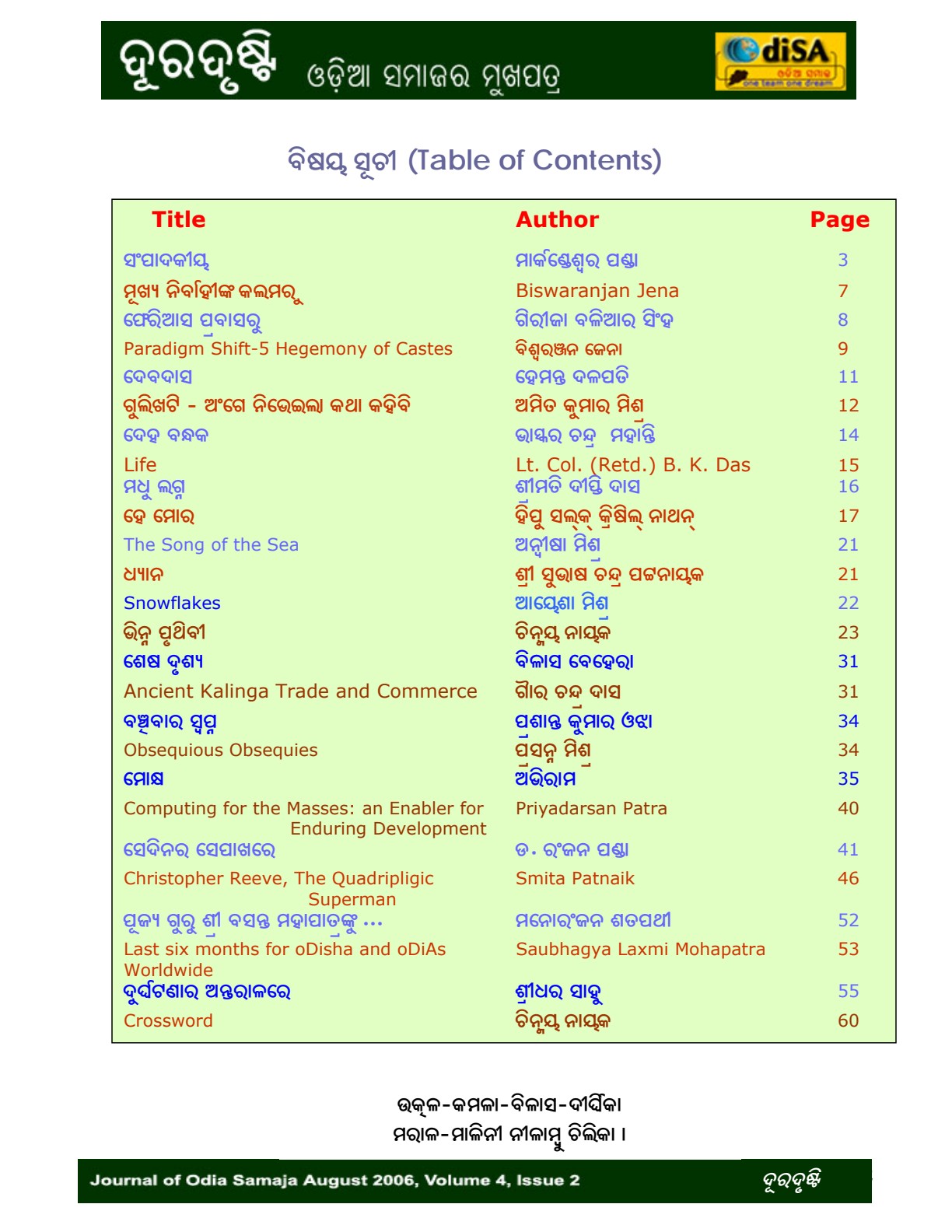
Article links by listed page
Entries follow the printed table: left column first, then right where present. Odia titles remain in the image above; no automatic text transcription is substituted.
- Contents entry 1 · page 3
- Contents entry 2 · page 7
- Contents entry 3 · page 8
- Contents entry 4 · page 9
- Contents entry 5 · page 11
- Contents entry 6 · page 12
- Contents entry 7 · page 14
- Contents entry 8 · page 15
- Contents entry 9 · page 16
- Contents entry 10 · page 17
- Contents entry 11 · page 21
- Contents entry 12 · page 21
- Contents entry 13 · page 22
- Contents entry 14 · page 23
- Contents entry 15 · page 31
- Contents entry 16 · page 31
- Contents entry 17 · page 34
- Contents entry 18 · page 34
- Contents entry 19 · page 35
- Contents entry 20 · page 40
- Contents entry 21 · page 41
- Contents entry 22 · page 46
- Contents entry 23 · page 52
- Contents entry 24 · page 53
- Contents entry 25 · page 55
- Crossword · listed page 60 · content missing from the preserved PDF
Contents source notes
The clickable rows follow the printed contents and local PDF page sequence. Original PDF links were compared where present; conflicting or duplicate links were not copied blindly. The original PDF and page images are unchanged.
The contents lists Crossword on page 60, but the preserved PDF page has only a header and feedback footer. The crossword itself was not recovered here.
Reading source
Original magazine menu restored as static links. Page images and clickable contents follow the preserved PDF edition. Surviving web menu · Preserved PDF